Server Tests
This section covers recommended practices for writing Artemis server tests.
Docker is required to run server tests. Tests run against PostgreSQL via Testcontainers by default to match the production database engine.
You can execute server tests with the following commands:
- Execute all tests (PostgreSQL, default):
./gradlew test -x webapp - Execute tests with a coverage report:
./gradlew test jacocoTestReport -x webapp - Run a single test:
./gradlew test --tests ExamIntegrationTest -x webapp - Execute all tests against H2 (in-memory, no Docker needed, for quick local iteration):
./gradlew test -x webapp -Dzonky.test.database.type=H2 - Verify code coverage (after tests):
./gradlew jacocoTestCoverageVerification -x webapp
The code coverage thresholds are defined in jacoco.gradle.
To run the server tests against MySQL in a Docker test container, use:
- Execute tests with MySQL container:
./gradlew testMysql -x webapp
General testing tips
Use appropriate and descriptive names for test cases so developers can easily understand what you test without looking deeper into it.
Instead of naming your variables int a, double b, String c, you should use meaningful names that elucidate their purpose.
To increase readability, prefix variable names with actual and expected.
We want to follow the naming convention should<ExpectedBehavior>When<StateUnderTest>.
For example, if you want to test that an unknown user should not be able to borrow a Book, BookIntegrationTest.shouldReturnForbiddenWhenUserUnknown() would be an appropriate name for the test case.
Using a nested class can improve the readability of the test names as well as the structure of the test class.
When comparing two books in the test, use meaningful names such as actualBook and expectedBook.
@Nested
class BorrowBook {

    @Test
    void shouldReturnForbiddenWhenUserUnknown() {
        [...]
        assertThat(actualBook).isEqualTo(expectedBook);
    }

    [...]
}
Try to follow the best practices for Java testing:
- Write small and specific tests by using helper functions with relevant parameters.
- Assert what's relevant and avoid writing a single test covering all edge cases.
- Write dumb tests by avoiding the reuse of production code and focusing on comparing output values with hard-coded values.
- Invest in a testable implementation by avoiding static access, using constructor injection, and separating business logic from asynchronous execution.
- Instead of using random, use fixed test data to make error messages better understandable.
- Make use of JUnit 5 features such as parameterized tests and nested test classes.
- Follow best practices related to spring testing.
For a more detailed overview, check out modern best testing practices.
Assert using the most specific overload method
When asserting in server tests, use assertThat from the AssertJ library.
Another assertion statement, such as isEqualTo(), must follow the call.
Using specific assertion statements rather than always expecting boolean values is the best practice.
For example, instead of
assertThat(submissions.size()).isEqualTo(1);
assertThat(submissionInDb.isPresent()).isTrue();
assertThat(submissionInDb.get().getFilePath().contains("file.png")).isTrue();
use the built-in assertions directly:
assertThat(submissions).hasSize(1);
assertThat(submissionInDb).isPresent();
assertThat(submissionInDb.get().getFilePath()).contains("file.png");
These assertions provide better error messages when they fail and improve the code readability. However, not all methods are suitable for this type of assertion.
If the isTrue assertion is unavoidable, specify a custom error message using the as keyword:
assertThat(submission.isSubmittedInTime()).as("submission should be in time").isTrue();
For more information, please read the AssertJ documentation, especially the section about avoiding incorrect usage.
ArchUnit
Use the ArchUnit library to prevent the unintentional inclusion of unnecessary packages. We use the library to enforce consistency in the code base. Here is a simple ArchUnit test using an ArchRule to forbid JUnit assertions (in favor of AssertJ ones).
@Test
void testNoJunitJupiterAssertions() {
    ArchRule noJunitJupiterAssertions = noClasses().should().dependOnClassesThat().haveNameMatching("org.junit.jupiter.api.Assertions");

    noJunitJupiterAssertions.check(testClasses);
}
We first define the ArchRule prohibiting the JUnit assertion package and then enforce it in test classes.
Add new general ArchUnit test cases into the existing ArchitectureTest class or create a new class extending AbstractArchitectureTest for more specific tests.
Counting database query calls within tests
It's possible to write tests checking how many database accesses an operation performs. These tests ensure that code changes don't inadvertently decrease performance and remind developers if they do, which is especially important for commonly used functionality. However, we should carefully consider before adding such assertions as the test becomes more tedious to maintain.
The test below tracks how many database accesses a REST call performs.
The custom assert assertThatDb uses the HibernateQueryInterceptor to count the number of queries.
The assertion checks the number of database accesses and returns the original result of the REST call, which you can continue to use throughout the test.
class TestClass {

    @Test
    @WithMockUser(username = "student1", roles = "USER")
    void testQueryCount() throws Exception {
        var courses = assertThatDb(() -> request.get("/api/course/courses/for-dashboard", HttpStatus.OK, CoursesForDashboardDTO.class)).hasBeenCalledAtMostTimes(8);
        assertThat(courses).isNotNull();
    }
}
UtilServices and factories
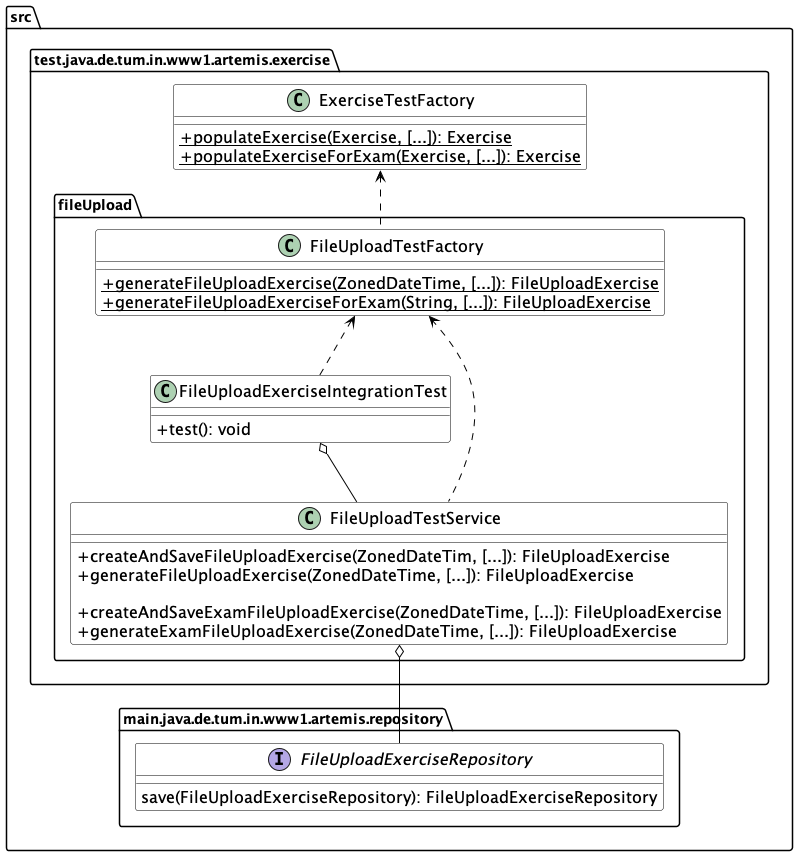
When setting up data in tests, use helper functions from corresponding UtilService and Factory classes. We use the factory method pattern to structure test cases. In general, UtilServices manage the communication with the database, and Factories are responsible for object creation and initialization. If you cannot find the correct helper function, add a new one to the most fitting UtilService or Factory and enhance it with Javadoc.
Test performance tips
Fast tests provide quick feedback, enabling developers to address issues and speed up the development process. We execute test groups (JenkinsLocalVC, LocalCILocalVC, LocalVCSaml, Unit Tests, Independent Tests) in parallel, trying to balance them out. When creating a new integration test, keep the test group balance in mind and consider adding the class to any other group, especially LocalCILocalVC, LocalVCSaml, or Independent Tests. Additionally, consider the spring profiles the new test cases need when deciding on the test group.
Follow these tips to write performant tests:
- Avoid database access as much as possible. It is very time-consuming, especially when running tests against MySQL or Postgres.
- Avoid unnecessary mocked requests by directly setting up the data and saving it in the database.
- Use the Awaitility library for asserting async code.
- Limit object creation in tests and the test setup.
After a server test run, Artemis prints a Test Bucket Timing Summary for the integration-test buckets.
Use the Wall time column to find the bucket that dominates the parallel run, Class time to see the accumulated time spent in test classes,
and Gap to estimate waiting time where no class in the bucket was active.
The slowest-class list below the table identifies candidates for local setup optimizations or for rebalancing into a compatible bucket.
A Test CPU Usage Summary follows it, showing average/peak system- and JVM-wide CPU utilization and a parallelization headroom hint.
If many cores stay idle, the run is bound by the per-bucket @ResourceLock (one active class per bucket) rather than by CPU.
Experimental: to bound the peak number of concurrently cached Spring contexts (server starts) on machines with fewer cores, run with
-Dartemis.test.wave-ordering.enabled=true -Dspring.test.context.cache.maxSize=<waveSize>.
This groups buckets into waves of artemis.test.wave-size (default: available cores) via BucketWaveClassOrderer, so finished
waves' contexts can be evicted before the next wave loads. Validate per target machine — JUnit has no cross-class barrier, so a
wave boundary can occasionally reload a context.
Spring Boot Server Starts and Context Configuration
Spring Boot caches test application contexts and reuses them when configurations match.
When certain annotations differ between test classes, Spring creates separate contexts, causing additional server starts.
We enforce a maximum of 11 server starts during test execution via the GitHub Action in supporting_scripts/extract_number_of_server_starts.sh.
A context is only worth its start-up cost if it shortens the critical path of a run by more than it adds, which is what splitting a bucket in two does and what an accidental context does not.
Annotations That Can Cause Context Pollution
The following annotations can cause Spring to create new application contexts if used outside base classes:
| Annotation | Impact |
|---|---|
@MockitoSpyBean | Creates new context when spy configuration differs |
@MockitoBean | Creates new context when mock configuration differs |
@TestPropertySource | Creates new context when properties differ |
@ActiveProfiles | Creates new context when active profiles differ |
@DirtiesContext | Marks context as dirty, forcing recreation for subsequent tests |
@ContextConfiguration | Creates new context when configuration differs |
@SpringBootTest | Creates new context when boot configuration differs |
@Import | Creates new context when imported configurations differ |
@Profile | No-op on test classes (they're not Spring beans), but checked for consistency |
@Conditional* | No-op on test classes (they're not Spring beans), but checked for consistency |
Allowed Base Test Classes
Only the following abstract base test classes are permitted to define context-affecting annotations:
| Base Test Class | Hazelcast Instance | Purpose |
|---|---|---|
AbstractSpringIntegrationIndependentTestBase | N/A | Shared mocks and setup for independent test buckets |
AbstractSpringIntegrationIndependentTest | Artemis_independent | Independent tests without CI/CD integration |
AbstractSpringIntegrationIndependentBatchTest | Artemis_independent_batch | Second independent bucket for balanced parallel execution |
AbstractSpringIntegrationJenkinsLocalVCTest | Artemis_jenkins | Jenkins + LocalVC integration |
AbstractSpringIntegrationJenkinsLocalVCTemplateTest | Artemis_jenkins_template | Jenkins template tests |
AbstractSpringIntegrationJenkinsLocalVCBatchTest | Artemis_jenkins_batch | Jenkins batch tests |
AbstractSpringIntegrationLocalCILocalVCTestBase | N/A | Shared mocks and setup for the two local CI + LocalVC buckets |
AbstractSpringIntegrationLocalCILocalVCTest | Artemis_localci_localvc | Local CI + LocalVC integration |
AbstractSpringIntegrationLocalCILocalVCBatchTest | Artemis_localci_localvc_batch | Second local CI + LocalVC bucket for balanced parallel execution |
AbstractSpringIntegrationLocalVCSamlTest | Artemis_localvc_saml | LocalVC with SAML authentication |
AbstractArtemisBuildAgentTest | Artemis_build_agent | Build agent tests |
Exception: RedissonDistributedDataTest is allowed to have its own @TestPropertySource for Redis-specific configuration, as it requires a separate context.
Rules for Test Classes
- Never add
@MockitoSpyBeanor@MockitoBeanto concrete test classes. Add them to the appropriate base class instead. - Never add
@TestPropertySourceto concrete test classes. Add properties to the appropriate base class. - Never add
@ActiveProfilesto concrete test classes. The profiles are defined in base classes. - Never use
@DirtiesContext. Clean up test state manually instead of dirtying the context. - Never add
@ContextConfiguration,@SpringBootTest, or@Importto concrete test classes. These are defined in base classes. - Never use
@Profileor@Conditional*on test classes. These are meant for Spring beans, not test classes. - If you need a new spy bean or property, add it to the appropriate base class and update the
resetSpyBeans()method. - Every
@MockitoBeanand@MockitoSpyBeanmust be reset after each test. A mock lives on the shared Spring context, so stubbing it is global state: whatever one test sets stays set for every test that follows in that context. Tests that stub the same bean themselves hide this, so it surfaces as an order-dependent failure in a class that never touches the bean — it inherits a stub from a class that ran earlier.LocalVCFetchAndPushIntegrationTestleftdoReturn(true).when(ldapTemplate).compare(...)behind, which had LDAP accepting every password for the rest of the run. - An architecture test (
SpringContextConfigurationArchitectureTest) enforces these rules automatically, including the reset above: a bean counts as reset when the class declaring it reads it in an@AfterEachmethod, or in one namedresetSpyBeans.
Why This Matters
Each additional Spring context causes:
- Extra server startup time (~30-60 seconds per context)
- Increased memory usage
- Longer CI pipeline execution
Avoid using @MockitoBean
Do not use the @MockitoSpyBean or @MockitoBean annotation unless absolutely necessary or possibly in an abstract Superclass.
Here you can see why in more detail.
Whenever @MockitoBean appears in a class, the application context cache gets marked as dirty, meaning the runner will clean the cache after finishing the test class.
The application context is restarted, which leads to an additional server start with runtime overhead.
We want to keep the number of server starts minimal.
To avoid new MockitoSpyBeans, we now use static mocks. We no longer mock the uppermost method but only throw the exception at the place where it could actually happen. At the end of the test, you need to close the mock again.
Parallel test execution
We use the JUnit 5 feature to execute tests in parallel.
The following line in the junit-platform.properties file enables parallel test execution with JUnit 5.
Setting the property to false disables parallel test execution.
junit.jupiter.execution.parallel.enabled = true
To execute a test class and its inheriting classes in parallel, we annotate it with @Execution(ExecutionMode.CONCURRENT).
Since we need to isolate resources such as
databases and application contexts, we use the @ResourceLock annotation.
By annotating abstract base classes with it, we group tests into parallel running groups while preserving the sequential execution of tests within each group.
@SpringBootTest
@AutoConfigureMockMvc
@ExtendWith(SpringExtension.class)
@Execution(ExecutionMode.CONCURRENT)
@ResourceLock("AbstractSpringIntegrationIndependentTest")
@AutoConfigureEmbeddedDatabase
@ActiveProfiles({ SPRING_PROFILE_TEST, PROFILE_ARTEMIS, PROFILE_SCHEDULING })
@TestPropertySource(properties = { "artemis.user-management.use-external=false" })
public abstract class AbstractSpringIntegrationIndependentTest extends AbstractArtemisIntegrationTest { ... }
Note that parallel test execution is only safe if the tests are independent and will lead to flaky tests otherwise.